In this AMV the creator mixed scenes of the band playing from the real music video into the video with compositing. On Linux it is really easy to do this same effect with a high level of control, only down fall is you got to be able to visualize what you want, it's a good idea to think about this and try to draw it out or write it out on paper.
So here it is an a nutshell, we open a blank image in Inkscape and use black and white, then open that in say, OpenShot and select which color to make transparent. It is as easy as that, and with the help of key frames that image can be animated across the screen, like a moving window to the background layer of video.
Song: Best of You
Artist: Foo Fighters
Anime: Various
Showing posts with label How-To. Show all posts
Showing posts with label How-To. Show all posts
Thursday, November 11, 2010
Wednesday, September 15, 2010
OpenShot Basics
The developer of OpenShot has made a commitment to stick with three basic criteria for his application they are: easy to use, stable, powerful. Well Jonathon has done just that, I would recommend this program to an average pc user, it has been stable since before 1.0, and with the compositing feature and high definition capability it is just as powerful as any proprietary video editor. In fact I'd argue that it gets more power from the hardware seeing as it as a native Linux application.
Fun fact; if you go to Pixar's website to purchase software for digital animation you can choose between Linux, Mac-OSX and Windows, and chances are the server farms are all running Linux. Although the real cool thing is that one of the artists (Windows clients) can connect to the server (Linux), and have it take care of its' processing needs.
Here is a quick demonstration of using OpenShot. In the video you will see adding files to the time-line, zooming in and out in the time-line, using layers, adding transitions creating a title and credits, and exporting. This was made with version 0.8.2, the current release is 1.2 and has made exporting simpler, and added an easy way to add 3d text.
Screencast of OpenShot 0.8.2 from Jonathan Thomas on Vimeo.
As seen above this software is really simple, but the use of layers and compositing the potential to create something amazing is there. Look forward to more on OpenShot
Fun fact; if you go to Pixar's website to purchase software for digital animation you can choose between Linux, Mac-OSX and Windows, and chances are the server farms are all running Linux. Although the real cool thing is that one of the artists (Windows clients) can connect to the server (Linux), and have it take care of its' processing needs.
Here is a quick demonstration of using OpenShot. In the video you will see adding files to the time-line, zooming in and out in the time-line, using layers, adding transitions creating a title and credits, and exporting. This was made with version 0.8.2, the current release is 1.2 and has made exporting simpler, and added an easy way to add 3d text.
Screencast of OpenShot 0.8.2 from Jonathan Thomas on Vimeo.
As seen above this software is really simple, but the use of layers and compositing the potential to create something amazing is there. Look forward to more on OpenShot

Tuesday, May 11, 2010
Cinelerra Tutorials Continued

Learn about how to install Cinelerra at its' homepage I'd recommend trying out the Elive live-cd, if you are a windows user. All you do is burn the cd and restart your pc into a fully functional production system.
Currently to achieve what Cinelerra does in windows, one would have to purchase more then one application (a video editor & compositor). Then for more advanced effects, a photo manipulation program would be required, which would be another cost. In my honest opinion windows software just can't match the power of open source. One example off the top of my head is the render-farm feature. With Linux it is real easy to have twenty pcs all hooked up to the same network in such a way where they work together. In fact it just might be to easy.
Tutorial Time
Every video needs credits, it just wouldn't be nice to not give credit where credit is due. So let's go over a simple yet extremely powerful method for adding text. Of course with a little playing around you could have the same sliding text like the Star Wars Movie. If you go back to the previous post, there is a tutorial of title. One of the ways to add titles was to put in keyframes and type in between them to make it look like you were typing in the video, really cool.
What makes this method so powerful is that, it's extremely easy to make it look however it was imagined. From creating your custom font just for the video, to having it scrolling over a video, or ever spinning around a center point in 3d, like the rings of Saturn. "If theres a will there a way" I like to say.
Scrolling Text Pt1
Scolling Text Pt2
So, bet you are already working on your text, know I was ready to begin after watching. There will be more tutorials to come, such as picture in picture and motion tracking to start off.
Friday, April 2, 2010
Papagayo and Synfig

Designed to help you line up phonemes (mouth shapes) with the actual recorded sound of actors speaking. Papagayo makes it easy to lip sync animated characters by making the process very simple - just type in the words being spoken (or copy/paste them from the animation's script), then drag the words on top of the sound's waveform until they line up with the proper sounds.
After syncing up mouth shapes with actual sounds, Papagayo can then export the result for use with Anime Studio, their 2D animation product. I couldn't find the Linux version though. I am trying Synfig.
Papagayo is free to download and use. Sync 'till your virtual lips are sore! Papagayo is available for Windows, Mac OS X, and Linux. Download @ Lost Marble


Synfig is a powerful, industrial-strength vector-based open-source 2D animation software package, designed from the ground-up for producing feature-film quality animation with fewer people and resources. While there are many other programs currently on the market to aid with the efficient production of 2D animation, there currently is not any other software that can do what this software can.
2D Animation has traditionally been very expensive because every frame must be drawn by hand. Even with today's digital inking and painting software, the process still relies on individuals hand-drawing each frame. This laborious task is called "tweening".
Synfig eliminates the task of manual tweening, producing smooth, fluid motion without the animator having to draw out each frame individually. This allows you to produce 2D animation with fewer people while producing art of a higher quality. Download @ Tux Family
Synfig Demo Reel

Tuesday, March 23, 2010
Good Lip-Syncing
Song: Ted and the Gooch - I Like You. This is a good example of lip-syncing. The creator describes AMV as his stepping stone, in lip-syncing.
"The main purpose of making this amv was to expand my Lip-syncing prowess, and I definitely got the chance to put together a number of complicated shots. The shot on the line ".. to be less of a loser" is the most difficult shot I've ever had to lipsync with 2 layers of moving background, a bar in the foreground, a shadow over her face briefly, and hair swaying over her jawline on either sides of a side-profile shot."
Original Post @ animemusicvideos.org in 720p
"The main purpose of making this amv was to expand my Lip-syncing prowess, and I definitely got the chance to put together a number of complicated shots. The shot on the line ".. to be less of a loser" is the most difficult shot I've ever had to lipsync with 2 layers of moving background, a bar in the foreground, a shadow over her face briefly, and hair swaying over her jawline on either sides of a side-profile shot."
Original Post @ animemusicvideos.org in 720p
Linux Digital Artisan Tools
Lets take a look at our tools and get familiar with them. When editing I prefer a combination of LiVES, Cinelerra, and customized Gimp script that interfaces it with LiVES, but in favor of the K.I.S.S. method, this site will use KdenLive. It is easy to use and is often compared to Sony Vegas Pro.
All the tools on this site are Linux tools, and any Linux distro, should have KdenLive in its' application repository. In Linux most of the users install all of there software, from one source, that is maintained by the developers of the operating system. They do so using a package manager. It is one of the top priorities to look into when choosing a Linux Distro. The package manager makes or breaks a good Distro. New users are recommended to use Ubuntu.
This quick tutorial will teach you how to put together a video complete with titles, transitions and effects! It's easy to learn the basics of video editing, especially in Linux! It's like Sony Vegas, except it's free and open-source!
This tutorial will teach you how to create a picture in picture transition.
This tutorial will show you how to overlay several images over a video and animate them.
As seen above, video editing is easy, just make a couple videos, do a slide-show, and get to know the layout. Skills in gimp are also a must for adding lot more functionality tool your toolkit as a digital artisan. The star animation in the last video was made with GIMP, and synfig, both of these apps are also available on windows. The animation was basically a slide-show.
Here is a two part introduction to GIMP Basics. Gimp is a photoshop substitute. The tutorial covers the scale, crop, cut with transparency, flip, and rotate commands. It was created by Mike Lively of Northern Kentucky University.
This part covers saving and file size reduction. While the creator of these tutorial recommends, saving as a jpg, gif, or png, when I save an image for editing in a video I save it an the OpenEXR format. OpenEXR is a high dynamic range imaging image file format. TGA File Format, often referred to as TARGA File Format, is a raster graphics file format, and is also ideal for games design.
All the tools on this site are Linux tools, and any Linux distro, should have KdenLive in its' application repository. In Linux most of the users install all of there software, from one source, that is maintained by the developers of the operating system. They do so using a package manager. It is one of the top priorities to look into when choosing a Linux Distro. The package manager makes or breaks a good Distro. New users are recommended to use Ubuntu.
This quick tutorial will teach you how to put together a video complete with titles, transitions and effects! It's easy to learn the basics of video editing, especially in Linux! It's like Sony Vegas, except it's free and open-source!
This tutorial will teach you how to create a picture in picture transition.
This tutorial will show you how to overlay several images over a video and animate them.
As seen above, video editing is easy, just make a couple videos, do a slide-show, and get to know the layout. Skills in gimp are also a must for adding lot more functionality tool your toolkit as a digital artisan. The star animation in the last video was made with GIMP, and synfig, both of these apps are also available on windows. The animation was basically a slide-show.
Here is a two part introduction to GIMP Basics. Gimp is a photoshop substitute. The tutorial covers the scale, crop, cut with transparency, flip, and rotate commands. It was created by Mike Lively of Northern Kentucky University.
This part covers saving and file size reduction. While the creator of these tutorial recommends, saving as a jpg, gif, or png, when I save an image for editing in a video I save it an the OpenEXR format. OpenEXR is a high dynamic range imaging image file format. TGA File Format, often referred to as TARGA File Format, is a raster graphics file format, and is also ideal for games design.
Thursday, March 18, 2010
FooLy CooLy - Coldplay
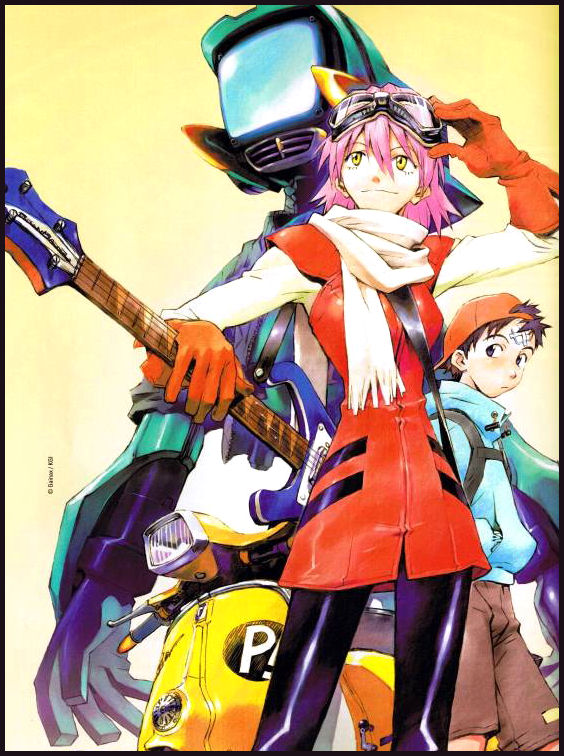
Regarding the AMV it is based of the anime FLCL. FLCL follows Naota Nandaba, a twelve-year-old boy living in the fictional Japanese suburb of Mabase, and his interactions with Haruko Haruhara.
Naota's life is confined to going to school and living with his father and grandfather. His usually boring life is rudely interrupted by the arrival of Haruko Haruhara, who bursts on the scene by running Naota over with her Vespa scooter, then giving him CPR and hitting him on the head with a blue vintage Rickenbacker 4001 left-handed reverse strung electric bass guitar. Later, Naota is shocked to find Haruko working in his house as a live-in maid
A couple years ago I tried to watch this series, but just didn't like it. Don't know what it was, it just didn't keep my interested, I guess. This AMV is awesome though, the creator did a very good job of capturing and presenting the emotion of the audio. On the other hand I can see that this creator only used basic techniques, and tried lip-syncing, but didn't succeed. Again this is still a great AMV.
 Lip-syncing is a very time consuming process. There are two ways that I can think of. The first method is easy and for this method, you need a clip in which NOTHING is moving except the character's mouth. Simply place the clip on the time-line in Lives , and then use the left and right arrow keys to skip through the clip frame by frame. Just move through each frame until you get to one where the character's mouth is completely closed.
 Now, select the razor tool, and cut your video clip EXACTLY where the edit line is intersecting it. Now, tap the right arrow key to advance forward one frame, and use the Razor tool again here. You may need to zoom in to be able to do this accurately.
Now click the selection tool, and select the frame that you just cut out. You may want to move it to a different video track so it wont get in your way while you are cutting out more video frames.
The other method for lip-syncing, will be posted shortly with another AMV :) See you then :)
Subscribe to:
Posts (Atom)
Unchained
Nothing like an awesome to MMV (manga music video) to mix things up. Superb editing on this video, never having a still image and run...
-
 Nothing like an awesome to MMV (manga music video) to mix things up. Superb editing on this video, never having a still image and run...
 -
 Not much to say here. Fast, action packed anime music video with a good metal song. The anime looks pretty interesting, after reading...
 -
 The editor Shin has done it once again, blending just the right song with finely picked clips from just a single anime. Have yet to se...