In this AMV the creator mixed scenes of the band playing from the real music video into the video with compositing. On Linux it is really easy to do this same effect with a high level of control, only down fall is you got to be able to visualize what you want, it's a good idea to think about this and try to draw it out or write it out on paper.
So here it is an a nutshell, we open a blank image in Inkscape and use black and white, then open that in say, OpenShot and select which color to make transparent. It is as easy as that, and with the help of key frames that image can be animated across the screen, like a moving window to the background layer of video.
Song: Best of You
Artist: Foo Fighters
Anime: Various
Showing posts with label tips-n-tricks. Show all posts
Showing posts with label tips-n-tricks. Show all posts
Thursday, November 11, 2010
Wednesday, September 15, 2010
OpenShot Basics
The developer of OpenShot has made a commitment to stick with three basic criteria for his application they are: easy to use, stable, powerful. Well Jonathon has done just that, I would recommend this program to an average pc user, it has been stable since before 1.0, and with the compositing feature and high definition capability it is just as powerful as any proprietary video editor. In fact I'd argue that it gets more power from the hardware seeing as it as a native Linux application.
Fun fact; if you go to Pixar's website to purchase software for digital animation you can choose between Linux, Mac-OSX and Windows, and chances are the server farms are all running Linux. Although the real cool thing is that one of the artists (Windows clients) can connect to the server (Linux), and have it take care of its' processing needs.
Here is a quick demonstration of using OpenShot. In the video you will see adding files to the time-line, zooming in and out in the time-line, using layers, adding transitions creating a title and credits, and exporting. This was made with version 0.8.2, the current release is 1.2 and has made exporting simpler, and added an easy way to add 3d text.
Screencast of OpenShot 0.8.2 from Jonathan Thomas on Vimeo.
As seen above this software is really simple, but the use of layers and compositing the potential to create something amazing is there. Look forward to more on OpenShot
Fun fact; if you go to Pixar's website to purchase software for digital animation you can choose between Linux, Mac-OSX and Windows, and chances are the server farms are all running Linux. Although the real cool thing is that one of the artists (Windows clients) can connect to the server (Linux), and have it take care of its' processing needs.
Here is a quick demonstration of using OpenShot. In the video you will see adding files to the time-line, zooming in and out in the time-line, using layers, adding transitions creating a title and credits, and exporting. This was made with version 0.8.2, the current release is 1.2 and has made exporting simpler, and added an easy way to add 3d text.
Screencast of OpenShot 0.8.2 from Jonathan Thomas on Vimeo.
As seen above this software is really simple, but the use of layers and compositing the potential to create something amazing is there. Look forward to more on OpenShot

Tuesday, May 11, 2010
Cinelerra Tutorials Continued

Learn about how to install Cinelerra at its' homepage I'd recommend trying out the Elive live-cd, if you are a windows user. All you do is burn the cd and restart your pc into a fully functional production system.
Currently to achieve what Cinelerra does in windows, one would have to purchase more then one application (a video editor & compositor). Then for more advanced effects, a photo manipulation program would be required, which would be another cost. In my honest opinion windows software just can't match the power of open source. One example off the top of my head is the render-farm feature. With Linux it is real easy to have twenty pcs all hooked up to the same network in such a way where they work together. In fact it just might be to easy.
Tutorial Time
Every video needs credits, it just wouldn't be nice to not give credit where credit is due. So let's go over a simple yet extremely powerful method for adding text. Of course with a little playing around you could have the same sliding text like the Star Wars Movie. If you go back to the previous post, there is a tutorial of title. One of the ways to add titles was to put in keyframes and type in between them to make it look like you were typing in the video, really cool.
What makes this method so powerful is that, it's extremely easy to make it look however it was imagined. From creating your custom font just for the video, to having it scrolling over a video, or ever spinning around a center point in 3d, like the rings of Saturn. "If theres a will there a way" I like to say.
Scrolling Text Pt1
Scolling Text Pt2
So, bet you are already working on your text, know I was ready to begin after watching. There will be more tutorials to come, such as picture in picture and motion tracking to start off.
Friday, April 2, 2010
Papagayo and Synfig

Designed to help you line up phonemes (mouth shapes) with the actual recorded sound of actors speaking. Papagayo makes it easy to lip sync animated characters by making the process very simple - just type in the words being spoken (or copy/paste them from the animation's script), then drag the words on top of the sound's waveform until they line up with the proper sounds.
After syncing up mouth shapes with actual sounds, Papagayo can then export the result for use with Anime Studio, their 2D animation product. I couldn't find the Linux version though. I am trying Synfig.
Papagayo is free to download and use. Sync 'till your virtual lips are sore! Papagayo is available for Windows, Mac OS X, and Linux. Download @ Lost Marble


Synfig is a powerful, industrial-strength vector-based open-source 2D animation software package, designed from the ground-up for producing feature-film quality animation with fewer people and resources. While there are many other programs currently on the market to aid with the efficient production of 2D animation, there currently is not any other software that can do what this software can.
2D Animation has traditionally been very expensive because every frame must be drawn by hand. Even with today's digital inking and painting software, the process still relies on individuals hand-drawing each frame. This laborious task is called "tweening".
Synfig eliminates the task of manual tweening, producing smooth, fluid motion without the animator having to draw out each frame individually. This allows you to produce 2D animation with fewer people while producing art of a higher quality. Download @ Tux Family
Synfig Demo Reel

Tuesday, March 23, 2010
Good Lip-Syncing
Song: Ted and the Gooch - I Like You. This is a good example of lip-syncing. The creator describes AMV as his stepping stone, in lip-syncing.
"The main purpose of making this amv was to expand my Lip-syncing prowess, and I definitely got the chance to put together a number of complicated shots. The shot on the line ".. to be less of a loser" is the most difficult shot I've ever had to lipsync with 2 layers of moving background, a bar in the foreground, a shadow over her face briefly, and hair swaying over her jawline on either sides of a side-profile shot."
Original Post @ animemusicvideos.org in 720p
"The main purpose of making this amv was to expand my Lip-syncing prowess, and I definitely got the chance to put together a number of complicated shots. The shot on the line ".. to be less of a loser" is the most difficult shot I've ever had to lipsync with 2 layers of moving background, a bar in the foreground, a shadow over her face briefly, and hair swaying over her jawline on either sides of a side-profile shot."
Original Post @ animemusicvideos.org in 720p
Linux Digital Artisan Tools
Lets take a look at our tools and get familiar with them. When editing I prefer a combination of LiVES, Cinelerra, and customized Gimp script that interfaces it with LiVES, but in favor of the K.I.S.S. method, this site will use KdenLive. It is easy to use and is often compared to Sony Vegas Pro.
All the tools on this site are Linux tools, and any Linux distro, should have KdenLive in its' application repository. In Linux most of the users install all of there software, from one source, that is maintained by the developers of the operating system. They do so using a package manager. It is one of the top priorities to look into when choosing a Linux Distro. The package manager makes or breaks a good Distro. New users are recommended to use Ubuntu.
This quick tutorial will teach you how to put together a video complete with titles, transitions and effects! It's easy to learn the basics of video editing, especially in Linux! It's like Sony Vegas, except it's free and open-source!
This tutorial will teach you how to create a picture in picture transition.
This tutorial will show you how to overlay several images over a video and animate them.
As seen above, video editing is easy, just make a couple videos, do a slide-show, and get to know the layout. Skills in gimp are also a must for adding lot more functionality tool your toolkit as a digital artisan. The star animation in the last video was made with GIMP, and synfig, both of these apps are also available on windows. The animation was basically a slide-show.
Here is a two part introduction to GIMP Basics. Gimp is a photoshop substitute. The tutorial covers the scale, crop, cut with transparency, flip, and rotate commands. It was created by Mike Lively of Northern Kentucky University.
This part covers saving and file size reduction. While the creator of these tutorial recommends, saving as a jpg, gif, or png, when I save an image for editing in a video I save it an the OpenEXR format. OpenEXR is a high dynamic range imaging image file format. TGA File Format, often referred to as TARGA File Format, is a raster graphics file format, and is also ideal for games design.
All the tools on this site are Linux tools, and any Linux distro, should have KdenLive in its' application repository. In Linux most of the users install all of there software, from one source, that is maintained by the developers of the operating system. They do so using a package manager. It is one of the top priorities to look into when choosing a Linux Distro. The package manager makes or breaks a good Distro. New users are recommended to use Ubuntu.
This quick tutorial will teach you how to put together a video complete with titles, transitions and effects! It's easy to learn the basics of video editing, especially in Linux! It's like Sony Vegas, except it's free and open-source!
This tutorial will teach you how to create a picture in picture transition.
This tutorial will show you how to overlay several images over a video and animate them.
As seen above, video editing is easy, just make a couple videos, do a slide-show, and get to know the layout. Skills in gimp are also a must for adding lot more functionality tool your toolkit as a digital artisan. The star animation in the last video was made with GIMP, and synfig, both of these apps are also available on windows. The animation was basically a slide-show.
Here is a two part introduction to GIMP Basics. Gimp is a photoshop substitute. The tutorial covers the scale, crop, cut with transparency, flip, and rotate commands. It was created by Mike Lively of Northern Kentucky University.
This part covers saving and file size reduction. While the creator of these tutorial recommends, saving as a jpg, gif, or png, when I save an image for editing in a video I save it an the OpenEXR format. OpenEXR is a high dynamic range imaging image file format. TGA File Format, often referred to as TARGA File Format, is a raster graphics file format, and is also ideal for games design.
Thursday, March 18, 2010
FooLy CooLy - Coldplay
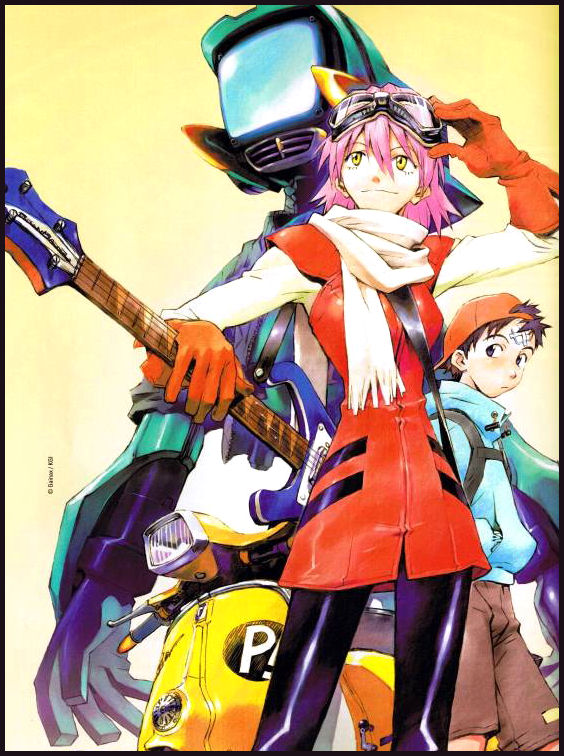
Regarding the AMV it is based of the anime FLCL. FLCL follows Naota Nandaba, a twelve-year-old boy living in the fictional Japanese suburb of Mabase, and his interactions with Haruko Haruhara.
Naota's life is confined to going to school and living with his father and grandfather. His usually boring life is rudely interrupted by the arrival of Haruko Haruhara, who bursts on the scene by running Naota over with her Vespa scooter, then giving him CPR and hitting him on the head with a blue vintage Rickenbacker 4001 left-handed reverse strung electric bass guitar. Later, Naota is shocked to find Haruko working in his house as a live-in maid
A couple years ago I tried to watch this series, but just didn't like it. Don't know what it was, it just didn't keep my interested, I guess. This AMV is awesome though, the creator did a very good job of capturing and presenting the emotion of the audio. On the other hand I can see that this creator only used basic techniques, and tried lip-syncing, but didn't succeed. Again this is still a great AMV.
 Lip-syncing is a very time consuming process. There are two ways that I can think of. The first method is easy and for this method, you need a clip in which NOTHING is moving except the character's mouth. Simply place the clip on the time-line in Lives , and then use the left and right arrow keys to skip through the clip frame by frame. Just move through each frame until you get to one where the character's mouth is completely closed.
 Now, select the razor tool, and cut your video clip EXACTLY where the edit line is intersecting it. Now, tap the right arrow key to advance forward one frame, and use the Razor tool again here. You may need to zoom in to be able to do this accurately.
Now click the selection tool, and select the frame that you just cut out. You may want to move it to a different video track so it wont get in your way while you are cutting out more video frames.
The other method for lip-syncing, will be posted shortly with another AMV :) See you then :)
Wednesday, March 17, 2010
OpenShot 1.1!
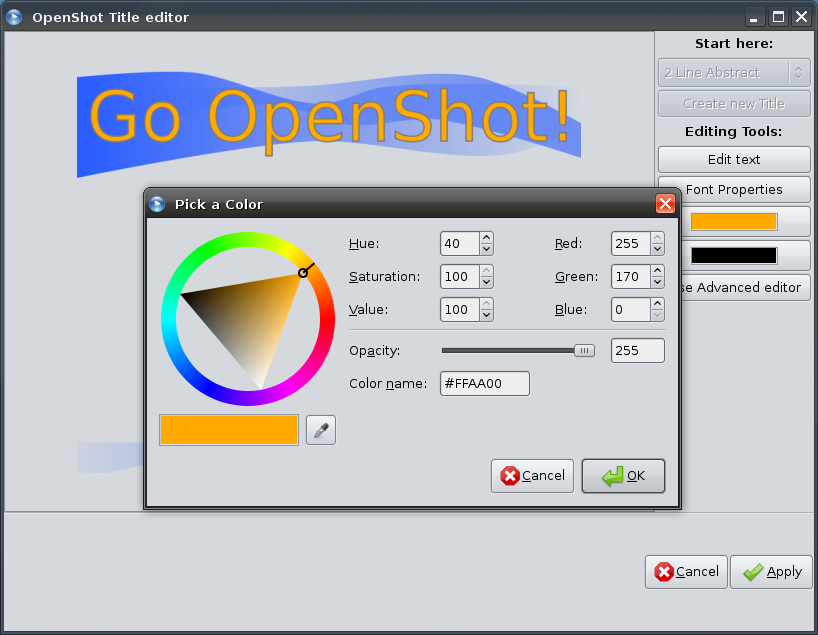
About OpenShot
Behind every great program, is a great story. Well... I'm not sure if this is a great story or not, but here it is. The author's name is Jonathan Thomas. He is a resident of Arlington, TX, USA. Jonathan Thomas is a professional software / web developer (12+ years experience).In early 2008, Jonathon first installed Ubuntu. He was very impressed, but like many people, realized immediately the lack of a video editor. For weeks he researched, downloaded, configured, compiled, and installed any Linux video editor I could find. It turns out there are many, but none that met his simple criteria.
- easy to use
- stable
- powerful
It doesn't get much easier then OpenShot, not that microsoft movie maker ins't easy, it's just that it only gives has two options, so it doesn't even count. With openshot, adding a slideshow is super easy, but you can spend hours making look the way you want, by adjusting transitions, picture in picture, add text, and more.
Another cool feature is, you can edit a picture that is black and white, and open shot will fade the shape of your pick, in or out.
OpenShot 1.1.0 Released! from Jonathan Thomas on Vimeo.
It seems that open-sourcing his project was a good idea, because the project has been moving ahead of schedule.
- Support for many video, audio, and image formats (based on FFmpeg)
- Gnome integration (drag and drop support)
- Multiple tracks
- Clip resizing, trimming, snapping, and cutting
- Video transitions with real-time previews
- Compositing, image overlays, watermarks
- Title templates, title creation
- SVG friendly, to create and include titles and credits
- Scrolling motion picture credits
- Solid color clips (including alpha compositing)
- Support for Rotoscoping / Image sequences
- Drag and drop timeline
- Frame stepping, key-mappings: J,K, and L keys
- Video encoding (based on FFmpeg)
- Key Frame animation
- Digital zooming of video clips
- Speed changes on clips (slow motion etc)
- Custom transition lumas and masks
- Re-sizing of clips (frame size)
- Audio mixing and editing
- Presets for key frame animations and layout
- Ken Burns effect (making video by panning over an image)
- Digital video effects, including brightness, gamma, hue, greyscale, chroma key (bluescreen / greenscreen), and over 20 other video effects
Screencast of OpenShot Chroma-Key Effect
Screencast of OpenShot Chroma-Key Effect from Jonathan Thomas on Vimeo.
OpenShot Key-Frame Demo!
Getting to understand and use key-frames is very important for getting into more advanced control over your videos. Say I put a thirdy second clip in the timeline. A key-frame can be placed at, the five second mark and another at the end, and then set it to fade, rotate, zoom, and many other thing much more precisely with key-frames.
OpenShot Has Effects!!!
There are plenty of effects to add, and most of them have multiple variable
settings.
OpenShot Video Gets Effects!!! from Jonathan Thomas on Vimeo.
settings.
OpenShot Video Gets Effects!!! from Jonathan Thomas on Vimeo.
Tuesday, January 19, 2010
The Right Tool for the Job or Hobby
After viewing some of the user productions of Cinelerra, I've become very anxious to get to work on creating a video of my own.
For his first video ever, this user has created a pretty good AMV. It's from the animated series Read Or Die. The visual cues thumping to the audio don't seem to be as good as say, Nostromos' AMVs, but this is this guys first attempt at using Cinelerra, and it is better then expected from a noob.
Certainly allot of effects for a first timer, makes me wonder if he's used an NLE (non-linear video editor) before, like Adobe Premier or Sony Vegas
About Cinelerra
Cinelerra is a prosumer non-linear video editing system. It is designed for the
GNU/Linux operating system. It is produced by Heroine Virtual, and is free
software distributed under the GNU General Public License. As a professional editing program, Cinelerra requires significant computing power.
Cinelerra includes support for very high-fidelity audio and video: it processes audio using 64 bits of precision, and can work in both RGBA and YUVA color spaces, using floating-point and 16-bit integer representations, respectively. It is resolution and frame rate-independent, meaning that it can support video of any speed and size.
Since it's Linux, it's been 64 bit compliant for years. In fact, Cinelerra is only recommended for 64 bit mode. The reason is the large amount of virtual memory required for page flipping and floating point images often exceeds the limit of 32 bits.
FLOATING POINT
Store and retrieve images in the best possible fidelity with floating point imaging and file formats. Access OpenEXR, the official file format of Lucasfilm. Access CR2 images from Canon EOS digital cameras in floating point. Adjust color levels without losing information. Never have to guess how far out of range the colors are. Save high dynamic range intermediates for multiple steps without losing data.
Cinelerra usage and awards
Cinelerra has gained ground among some GNU/Linux enthusiasts looking for a native video editing system. Professional use is mostly promoted by Linux Media Arts, which sells an integrated hardware and software package for video production that includes Cinelerra.
At the National Association of Broadcasters' 2004 Electronic Media Show, Cinelerra was awarded Bob Turner's "MAKING THE CUT" award. The award is given to "the best and most exciting postproduction products seen at the convention".
Just too many features to list. There is so much depth to the program. Join the community of creators at the official community site located here.
Basic Editing Tutorials
Watching these tutorials, will show everyone just how easy it can be to start producing top notch media with Open Source Software, on an Open Source Operating System(Linux). These videos are thanks to the Covey family
Add A Title
Add text onto any portion of your video.
Add custom fonts
Adding a custom font to the your video gives it even more personality. Creating your own font will give it even more uniqueness. Anyone can create there own font, The Gimp (general image manipulation prorgam) would be ideal for this.


The software is Open Source so why not buy a user manual.
In a more advanced topic we could setup the a plugin that allows The Gimp and Cinelerra to work together. Basically having photoshop in the video editor, which currently isn't doable in commercial software.
Slide Show Tutorials
Putting it all together - this tutorial involves manual fades, transitions and camera automation used to create a little (and I mean little) slide show from some digital photos in my library. Movie Maker Schmovie Maker!
Now Hopefully you have already installed Cinelerra, followed along and are ready for the more advanced topics to come.
For his first video ever, this user has created a pretty good AMV. It's from the animated series Read Or Die. The visual cues thumping to the audio don't seem to be as good as say, Nostromos' AMVs, but this is this guys first attempt at using Cinelerra, and it is better then expected from a noob.
Certainly allot of effects for a first timer, makes me wonder if he's used an NLE (non-linear video editor) before, like Adobe Premier or Sony Vegas
About Cinelerra
Cinelerra is a prosumer non-linear video editing system. It is designed for the
GNU/Linux operating system. It is produced by Heroine Virtual, and is free
software distributed under the GNU General Public License. As a professional editing program, Cinelerra requires significant computing power.
Cinelerra includes support for very high-fidelity audio and video: it processes audio using 64 bits of precision, and can work in both RGBA and YUVA color spaces, using floating-point and 16-bit integer representations, respectively. It is resolution and frame rate-independent, meaning that it can support video of any speed and size.
Since it's Linux, it's been 64 bit compliant for years. In fact, Cinelerra is only recommended for 64 bit mode. The reason is the large amount of virtual memory required for page flipping and floating point images often exceeds the limit of 32 bits.
FLOATING POINT
Store and retrieve images in the best possible fidelity with floating point imaging and file formats. Access OpenEXR, the official file format of Lucasfilm. Access CR2 images from Canon EOS digital cameras in floating point. Adjust color levels without losing information. Never have to guess how far out of range the colors are. Save high dynamic range intermediates for multiple steps without losing data.
Cinelerra usage and awards
Cinelerra has gained ground among some GNU/Linux enthusiasts looking for a native video editing system. Professional use is mostly promoted by Linux Media Arts, which sells an integrated hardware and software package for video production that includes Cinelerra.
At the National Association of Broadcasters' 2004 Electronic Media Show, Cinelerra was awarded Bob Turner's "MAKING THE CUT" award. The award is given to "the best and most exciting postproduction products seen at the convention".
Just too many features to list. There is so much depth to the program. Join the community of creators at the official community site located here.
Basic Editing Tutorials
Watching these tutorials, will show everyone just how easy it can be to start producing top notch media with Open Source Software, on an Open Source Operating System(Linux). These videos are thanks to the Covey family
Add A Title
Add text onto any portion of your video.
Add custom fonts
Adding a custom font to the your video gives it even more personality. Creating your own font will give it even more uniqueness. Anyone can create there own font, The Gimp (general image manipulation prorgam) would be ideal for this.
The software is Open Source so why not buy a user manual.
In a more advanced topic we could setup the a plugin that allows The Gimp and Cinelerra to work together. Basically having photoshop in the video editor, which currently isn't doable in commercial software.
Slide Show Tutorials
Putting it all together - this tutorial involves manual fades, transitions and camera automation used to create a little (and I mean little) slide show from some digital photos in my library. Movie Maker Schmovie Maker!
Now Hopefully you have already installed Cinelerra, followed along and are ready for the more advanced topics to come.
Monday, January 18, 2010
A Classics, One of the Best - G.I.T.S.
Ghost in the Shell.

The setting of Ghost in the Shell is cyberpunk or postcyberpunk, similar to that of William Gibson's Sprawl trilogy. Kusanagi and her colleagues face external threats and also suffer internal conflict over their own natures.
Ghost in the Shell made an impression on a number of filmmakers. Larry and Andy Wachowski, the creators of The Matrix and its sequels, showed it to producer Joel Silver, saying "we wanna do that for real." Director James Cameron has called it "the first truly adult animation film to reach a level of literary and visual excellence."
Overview
Ghost in the Shell takes place in the year 2029, when the world has become interconnected by a vast electronic network that permeates every aspect of life. People also tend to rely more and more on cybernetic implants and the first strong AIs make their appearance. The main entity presented in the various media is the Public Security Section 9 police force, which is charged to investigate cases like the Puppet Master and the Laughing Man.Yet, as those criminals are revealed to have more depth than was at first apparent, the various protagonists are left with disturbing questions: What exactly is the definition of human in a society where a mind can be copied and the body replaced with a fully synthetic body? What, exactly, is the "ghost" — the essence — in the cybernetic "shell"? Where is the boundary between human and machine when the differences between the two become more philosophical than physical?
Philosophical elements
Ghosts
In Ghost in the Shell, the word ghost is colloquial slang for an individual's consciousness. In the manga's futuristic society, science has redefined the ghost as the thing that differentiates a human being from a biological robot. Regardless of how much biological material is replaced with electronic or mechanical substitutes, as long as individuals retain their ghost, they retain their humanity and individuality.The concept of the ghost was borrowed by Masamune Shirow from an essay on structuralism, "The Ghost in the Machine" by Arthur Koestler. The title The Ghost in the Machine itself was originally used by an English philosopher, Gilbert Ryle to mock the paradox of conventional Cartesian dualism and Dualism in general. Koestler, like Ryle, denies Cartesian dualism and locates the origin of human mind in the physical condition of the brain. He argues that the human brain has grown and built upon earlier, more primitive brain structures, the "ghost in the machine", which at times overpower higher logical functions, and are responsible for hate, anger and other such destructive impulses. Shirow denies dualism similarly in his work, but defines the "ghost" more broadly, not only as a physical trait, but as a phase or phenomenon that appears in a system at a certain level of complexity. The brain itself is only part of the whole neural network; if, for example, an organ is removed from a body, the autonomic nerve of the organ and consequently its "ghost" will vanish unless the stimulus of the existence of the organ is perfectly re-produced by a mechanical substitution. This can be compared, by analogy, to a person born with innate deafness being unable to understand the concept of "hearing" unless taught.
Ghost-dubbing, or duplicating a ghost, is a near-impossible act in the Ghost in the Shell universe. When performed, as a cheap AI substitute in Innocence and earlier in the manga, the result is always inferior to the original-which always dies in the process. In Stand Alone Complex, criminals use a ghost-dubbing device to create numerous duplicates of South American drug lord Marcelo Jarti; after the original died, the device continued to duplicate him into a near-infinite number of bodies with identical memories and personalities, essentially immortalizing him.
In Ghost in the Shell, Kusanagi completely reproduces the stimulus of all of her organs in order to maintain her "ghost". If a technical error arises during the transfer of a "ghost" from one body to another, the transfer normally results in failure, since the "ghost" tends to deteriorate due to either the difference of system at the material level or the deficiency of the transferring protocol. The Puppet Master manages not to deteriorate its "ghost" when merging with Kusanagi because his system is the body of information itself, thereby avoiding a deterioration due to the deficiency at material level.
The Ancient Greeks had a similar paradox, called the Ship of Theseus. Hegel's concept of Geist may also be related.
Birth
Another interpretation of the fusion of Kusanagi and the Puppet Master is analogous to the concept of birth; whereby two separate entities create a third entity which is not the same as either of the originating ghosts or DNA sets but shares common traits. The Puppet Master carefully explains that diversity is the only way that he can continue; no matter how many times he copies himself, a trick, virus, or weakness discovered that destroys any of his copies could destroy them all. He quite specifically asks her to fuse her "ghost" or "soul" with his own, a form of marriage/birth in which the resultant being is neither the Puppet Master nor Kusanagi but a new being entirely. Notice the symbolism in the movie when Kusanagi/Puppet Master gets a new body - that of a child. This touches upon concepts of birth, immortality through progeny, and the union of two ghosts/people in the creation of progeny. Interestingly enough, her new body in the original manga is instead a male body. She also states that this new life-form will create children, as well.Connectivity
When Motoko merges with project 2501 (puppet master) she changes. The definition of this change, and what it will actually bring for her and for the world is, unfortunately, hidden very well in various pieces of dialogue and even scarcer visual analogies throughout the films, series, and manga. Focusing first on the film, where Mamoru Oshi took a very different stance in what themes he would emphasize and how he would emphasize them, the best place to look is in the conversation between the Puppet Master and the Major before they join."I am connected to a vast network, of which l myself am a part. To one like you, who cannot access it, you may perceive it only as light. As we are confined to our one section, so we are all connected. Limited to a small part of our functions. But now we must slip our bonds, and shift to the higher structure."
He then ends with "It is time to become a part of everything."
He is essentially saying, as he is a creature of information, he has fewer limits. He is in theory, not bound by any one form, however in reality, he is incapable of changing. The logic behind this is that, he is so fluid, in a world (the net) which is so fluid, motion is in itself stunted. By merging with Motoko, half of his 'vision' and his 'ability to see clearly the whole' will go to her, and her limited functions will help give the new being a shape, and a definition, which will allow it to seriously 'elevate' to expansion.
All her life, Motoko has wanted to be free of her anxieties about her origins and her frail human definition, but she has been so afraid of losing what little humanity she has, she is in quite a pathetic position, a sour one in any case, and one where she is incapable of undergoing any kind of change. So she will always possess those anxieties. Project 2501 doesn't give her a choice exactly, but she probably would have made it anyway, because it means she is freed of 'worldly' bonds and illusions, and is finally able to connect with her past and future, which define the present, rather than be locked in the current confined and retracted world she lives in.
'It is time to become a part of everything' is clearly referring to a sense of community and connectivity among everything in the world, and can be related to the ideas expressed in Zen Buddhism, and the Japanese culture, where there is a strong mentality of being part of whole, rather than alone as an individual. We are, and this is obvious when you look around, becoming increasingly isolated to our own worlds, our own desires and plans for life, and we can be so obsessed with what we're doing, we don't notice the intricate and beautiful patterns around us. We preach to the inverted, and we achieve less as individuals, and less as a group. Motoko, though deeply philosophical, is still a victim of this.
Project 2501 puts it into his own technical situation, saying that each entity is confined to its own section (task, purpose, desire) and that because of this each entity can call itself its own, even 2501. He is not suggesting that this is a bad thing, or that we can or should be everything, because such a concept would contradict everything else he talks about. He is merely expressing the traditional value that we can, as beings, as humans, live a much fuller life by recognizing we are a part of everything. All it takes is recognition, and we can attain a kind of enlightenment. This is what connectivity means. We can feel more relaxed, which Motoko clearly does, more at ease with herself, and somewhat excited about the world of possibilities for her.
Cyberbrain warfare and ghost hacking
Cyberbrain warfare is the practice of employing ghost hacking as a means of gaining access to an opponent's cyberbrain, and ultimately, their ghost. A successful cyberhacker can intercept, censor, or augment the sensory information being received by a victim, or even go so far as to destroy or rewrite complete memories. Furthermore, a person's cyberbrain can be directly injured, by making the cyberbrain undergo unaffordable computation and thus overheat. (See Cordwainer Smith's "The Burning of the Brain")Cyberbrain warfare is portrayed as a natural consequence of the integration of cybernetic and wireless communication technology directly into the human brain. Despite the apparent risks, even the most paranoid characters in the story find the benefits of directly networking their brains to be indispensable.
Apparently, any conduit by which information is absorbed by the brain can be exploited for ghost hacking. Shirow envisions the use of firewalls for protecting the ghost against attack, and multiple layers of encryption.
Mnemonic devices
Much like information stored in the hard-drive of a modern computer, the memories of a ghost can become fragmented and unreliable. This is the result of ghost-hacking, psychological treatment, trauma experienced while ghost-diving, corrupted transference from one cyber-brain to another, and the degradation of memories as they are collected and cross-referenced over the course of a lifetime.The response that humans have developed to cope with the confusion of memories is to reinforce them with external reminders. Artwork, books, clothing, personal electronics, places of employment, and even companions are carefully chosen to familiarize the landscape of one's existence. In a sense we are partly motivated in our actions by the desire to look back on them with fondness and clarity.
The need for these mnemonic devices is also a philosophical hurdle for the members of Section 9. They are, after all, a watchdog group mandated with rooting out cases of cyber-brain crime. Kusanagi shuns the accumulation of trinkets (beyond the watch she wears in Stand Alone Complex). Being an expert in ghost-hacking and the workings of the cyber-brain, she considers these to be a sign of weakness that can be easily read by enemies. In an age when a detective can reconstruct a person's psyche based on study of their external memory Kusanagi has a sound position. Even she, however, still keeps that one single watch, and still keeps the same model of cybernetic body.
Batou, on the other hand, is sentimental. He keeps a pet dog, has safe houses full of books and art, lifts weights despite it being pointless (due to the fact he is a full cyborg thus lacking organic muscle tissue), and even has a favorite Tachikoma to work with. Though they may be a fatal indication of one's living habits in his line of work he still clings to such comforts.
External memory
External memory is exactly that: memories and experiences that are stored "offline" onto a hard disk or such. If you possess a cyber brain (as the most of affluent in the 'Ghost in the Shell' universe do), there is a definite separation of mind and body since your brain case can be removed and put into a new body. Since there is an electronic separation, the signals received from the senses (touch, taste, etc.) can be recorded and replayed at any given time. Thus, you could record important events such as your wedding day and replay it as if you were actually there anytime you wish. Your external senses turn off, and you’re fed recorded sensory information. Better than any video camera recording, you're feeling the heat of the sun, the breeze, your brides’ hand trembling as you slip the ring on her finger, etc. Storing these memories also allows others to play them back and experience them as well.Tachikomas and fuchikomas
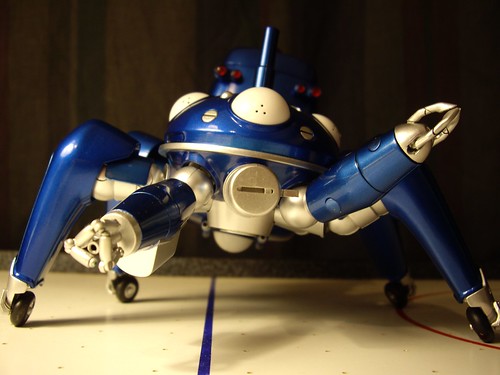
The underlying statement here is that predictable behavior results in inherent weakness. Section 9, as an organization, needs heterogeneity and even organic weakness if it is to survive. "A machine where all the parts respond the same way is a brittle tool."
Tachikoma ask questions that otherwise would not have been brought to mind, much like children that are trying to understand the world, yet with superior thinking capabilities. There are Tachikoma short clips that involve them discussing complex philosophical issues and how they relate to existence. They provide more of an innocent look on the world that surrounds them.
The Tachikomas are also used to approach the question of whether or not one's individuality can withstand a parallelization of information from a different perspective. Here, the parallelization is perfect since they are machines. In the series, they are able to retain their respective individualities through the use of external references (Batou's favorite, the one which has books, etc.), similarly to the Major.
Stand Alone Complex
While originally intended to "underscore the dilemmas and concerns that people would face if they relied too heavily on the new communications infrastructure, Stand Alone Complex eventually came to represent a phenomenon where unrelated, yet very similar actions of individuals create a seemingly concerted effort.A Stand Alone Complex can be compared to the emergent copycat behavior that often occurs after incidents such as serial murders or terrorist attacks. An incident catches the public's attention and certain types of people "get on the bandwagon", so to speak. It is particularly apparent when the incident appears to be the result of well-known political or religious beliefs, but it can also occur in response to intense media attention. For example, a mere fire, no matter the number of deaths, is just a garden variety tragedy. However, if the right kind of people begin to believe it was arson, caused by deliberate action, the threat that more arsons will be committed increases drastically.
What separates the Stand Alone Complex from normal copycat behavior is that there is no real originator of the copied action, but merely a rumor or an illusion that supposedly performed the copied action. There may be real people who are labeled as the originator, but in reality, no one started the original behavior. And in Stand Alone Complex, the facade just has to exist in the minds of the public. In other words, a potential copycat just has to believe the copied behavior happened from an originator-when it really didn't. The result is an epidemic of copied behavior having a net effect of purpose. One could say that the Stand Alone Complex is mass hysteria over nothing-yet causing an overall change in social structure.
This is not unlike the concepts of memes (refer to the conversation between the major and the Puppet Master in the manga) and second-order simulacra. It also has ties to social theory, as illustrated in the work of Frederic Jameson and Masachi Osawa.
It has been posited that the choice, by the writers of Ghost In The Shell: Stand Alone Complex, to use J.D. Salinger's short story, "The Laughing Man" as a key element in the story, was itself an example of second-order simulacra; the use of a story that could already be considered an example of second-order simulacra, by its popularity overshadowing the popularity of its original, The Man Who Laughs. This creates yet another example of the concept, by banking on the popularity of the show, the character, and the emblem used to represent The Laughing Man, supplanting the story as the Laughing Man by popularity alone.
In the series itself, it usually refers to events surrounding the Laughing Man case, and to some extents, the teamwork observed in Public Security Section 9. It is presented as an emergent phenomenon catalyzed by parallelization of the human psyche through the cyberbrain networks. A key point is that due to the electronic communications network that is increasingly permeating society, more and more people are being exposed to the same information and stimuli, making the overall psyche and responses of large groups of people increasingly similar, the result being that the potential increases exponentially for copycat behavior that forms a Standalone Complex. There is no original Laughing Man, no leader. Everyone is acting on his own, yet a coherent whole emerges. There are people who employed the copycat behavior before others, but what started the coherent whole is indefinitive.
The relation of the Stand Alone Complex to social theory is explored in more depth in the second season. A character, Kazundo Gouda, postulates that, by exploiting the mechanism of information transmission in society, one could achieve a very efficient and subtle thought control. Indeed, since people tend to modify slightly the information (and forget where it came from) in the processes of consumption (or appropriation), it becomes difficult to sort genuine ideas from modified, implanted ones. He proves to be very successful in the end.
Speaking of Media
There is plenty of Ghost in the Shell media to be had, from the manga series to the anime series and the remake of the original movie. There are also tons of fan-made content. Such as anime music videos.


![Ghost in the Shell 2.0 [Blu-ray]](https://lh3.googleusercontent.com/blogger_img_proxy/AEn0k_uUMzij1ZCbwiADn2ZYPl4U3QyXbXAu56oPahfPA05jF6I218mkE_8sF3SZMSXfXvMloCkcWsE_5VVPfVgA2N-3eL6oEd2znwfidLPL_u_1VxnH8c4DjUISMHFZhpmaNEgiFVxgR1wX5xw-ZHf8JtgxVMUgu4SAAIQrFTY4tLzRovc9MD2kN-sZupGjSbkTHWF8CU6CpyeqW49m8QTaUzdr2PlY-0q85g=s0-d)

![Ghost in the Shell 2: Innocence [Blu-ray]](https://lh3.googleusercontent.com/blogger_img_proxy/AEn0k_vT2V1sr12nA_0aztakIMu3CBu--aaUk8wuNmA9AYdu4YSPrls6ldmK2Z6rYghvomVkLN2FEcBO6IUoxxmn9QjOvxw9Jl3V9cJE7Azc7a4ulOJsymDT4Kj3AUNpC4B2qKfrZ8IIVh4e1s3BCLvt3Yl5xkklG4bLpeb3aMXZIw3PDPoVo6_zZixIRYmiqYLZKNAOCqrFK4Ffcgj3Z94_QnT42aw5zSGaWQ=s0-d)

Created By Nostromo - Scenes from the series
Creator Unknown - Scenes from Innocence
Creator Unknown - Scenes from the original Ghost in the Shell Movie


Saturday, January 16, 2010
Preventive Maintenance

There are heaps of reasons why Linux is more secure than Windows. Some believe that it's because Windows is the dominant OS and so that's the one that all the hackers want to attack - but this is a long way from being the principle reason why Linux (and BSD, as well as Mac) is safer than Windows. Most of the reasons are related to it's illustrious but very ancient predecessor, Unix. This operating system was designed, right from the beginning, to be used on a network - and in the days when computers were terribly expensive, security was a priority right from the outset. Normal users could only change their session and could not do anything to the core system itself.
What this translates to today is that any machine running Linux has a modular structure. As with Unix, a normal user cannot do anything that could be dangerous to the computer. Such actions can only be undertaken by opening a special session called 'root' which requires a specific password. What this means is that if someone wanted to attack your computer, (s)he would have to find a way of getting past this security procedure, which would be very difficult indeed. In Windows, on the other hand, it is much easier to do such operations, and so the potential hacker has much less work to do. Indeed, there are probably only two ways to get into the heart of a Linux system: 1) Do a directed attack against one particular individual; 2)Try to dupe users into installing the virus as root. For most people, this second is more likely. For example, there is a virus at the moment that works by trying to persuade you that you need to install a codec to read a multimedia file. All you have to do is click on the link and install it as root...This is a virus directed at Mac at the moment, but such nasties could also be written for Linux.
Another reason why Linux is more secure than Windows (and also why it's more secure than Mac) is that, as it's open source, it is constantly being worked on. 24 hours a day, 7 days a week someone somewhere is probably looking at the code; and if a problem is identified the solution can appear very quickly indeed, sometimes only hours after the problem was spotted.
Finally, Linux has something that the other operating systems couldn't possibly have, at least not to the extent that Linux has it: software repositories. If I want to download a program, and of course I do often, I do so from a server maintained by the official community of my version of Linux (Debian) - this means that the software has been checked very thoroughly before becoming available.
So, viruses are very, very unlikely in Linux, but that doesn't make them impossible. However, as Linux is modular in nature, any damage done could only be very limited (unless you foolishly install it yourself as root). As for spyware, that would need to be installed in the directory containing your Internet browser, which is protected by this root password. This is why we don't see such malware on Linux.
Windows Users (XP, Vista, 7)

People don't like change, and to switch to Linux just for security reasons, may be unreasonable, for average users. Why would you when there is so much anti-virus software available. The truth is, that if you practice the right procedures, your PC will be secure no matter what operating system you use. Without even adding another expense there are things that can be done to keep your Winows operating systems more secure then the average user.
One of the most crucial methods to staying more secure is to have a user account for installing certain applications and configuring the system (Admin). Then create child user accounts with very limited permissions for daily use. Basically whatever files the user can touch, the same would also apply to a hacker.
Still while using a child account malware, spyware, adware, will get into the PC and affect them accordingly. The best solution to this problem is the free download of spybot search and destroy, with the tea timer running in the background. Any virus that can make it into the system can remain dormant, and run as soon as a user logs in as admin to install a program, it could even be the program itself. That's why anti-virus software is installed and run frequently, but they can only catch items that are known by them.
My anti-virus software of choice, is Comodo AntiVirus. Comodo is a Certificate Authority, and is the second-largest issuer of business-validated certificates. Comodo's certificate profile includes OV certificates, DV certificates, EV SSL Certificates and Multi-Domain Certificates, Unified communications Certificates, email certificates and Code signing certificates. Comodo CA undergoes an annual WebTrust audit by Ernst & Young.
Who wouldn't feel safe with Comodo on there side? I know I would, they have the background and experience in keeping data safe. They help keep viruses off of PCs and say " when your business expands and see us more sophisticated security is needed.
The Comodo companies offer many free products through their website, available for public download. Most notable of Comodo's free products is the Comodo Internet Security freeware program, incorporating Comodo's firewall, Host Intrusion Prevention System and antivirus.
Other Comodo branded freeware security tools include an Anti-Malware tool, and a Memory Firewall, a free solution that protects against over 90% of buffer overflow attacks. For an additional fee, Comodo product users can subscribe to Comodo's computer cleaning and optimizing services for real-time computer assistance.
Comodo also offers a free registry cleaner program, now included within the Comodo System Cleaner. The regular use of this software can dramasricly increase performance, registry errors are a major factor in average users PCs that slows them down.
With proper usage of the Account Permissions, Spy-Bot, and the Comodo's Internet Security viruses should become a very rare occasion, and not be able to do to much damage. When installing the Comodo Internet Security be sure to disable the windows firewall before you begin. Comodo's Firewall is far more secure, and should be used.
Put an Old PC to Work!
Now there are tons of guide for what I'm about to explain, so 'll just discuss the benefits of such processes. Now these two tips can be done individually or on the same system.Network Proxy Server
A function that is often combined with a firewall is a proxy server. The proxy server is used to access Web pages by the other computers. When another computer requests a Web page, it is retrieved by the proxy server and then sent to the requesting computer. The net effect of this action is that the remote computer hosting the Web page never comes into direct contact with anything on your home network, other than the proxy server.
Proxy servers can also make your Internet access work more efficiently. If you access a page on a Web site, it is cached (stored) on the proxy server. This means that the next time you go back to that page, it normally doesn't have to load again from the Web site. Instead it loads instantaneously from the proxy server.

Squid is a full-featured web proxy cache server application which provides proxy and cache services for Hyper Text Transport Protocol (HTTP), File Transfer Protocol (FTP), and other popular network protocols. Squid can implement caching and proxying of Secure Sockets Layer (SSL) requests and caching of Domain Name Server (DNS) lookups, and perform transparent caching. Squid also supports a wide variety of caching protocols, such as Internet Cache Protocol, (ICP) the Hyper Text Caching Protocol, (HTCP) the Cache Array Routing Protocol (CARP), and the Web Cache Coordination Protocol. (WCCP)
The Squid proxy cache server is an excellent solution to a variety of proxy and caching server needs, and scales from the branch office to enterprise level networks while providing extensive, granular access control mechanisms and monitoring of critical parameters via the Simple Network Management Protocol (SNMP). When selecting a computer system for use as a dedicated Squid proxy, or caching servers, ensure your system is configured with a large amount of physical memory, as Squid maintains an in-memory cache for increased performance.
If you happen to have Ubuntu on your old PC then the install is as easy as one command in the terminal:
sudo apt-get install squid squid-common
Configuration steps can be found on Ubuntu's website.

Completes the Home Network and Theatre...
...and installs nicely on your proxy server machine
XBMC is an award-winning free and open source (GPL) software media player and entertainment hub for digital media. XBMC is available for Linux, OSX, Windows, and the original Xbox. It also runs on an appletv and a live-bootable cd or usb flash stick. Created in 2003 by a group of like minded programmers, XBMC is a non-profit project run and developed by volunteers located around the world. More than 50 software developers have contributed to XBMC, and 100-plus translators have worked to expand its reach, making it available in more than 30 languages.
While XBMC functions very well as a standard media player application for your computer, it has been designed to be the perfect companion for your HTPC. Supporting an almost endless range of remote controls, and combined with its beautiful interface and powerful skinning engine, XBMC feels very natural to use from the couch and is the ideal solution for your home theater.
Currently XBMC can be used to play almost all popular audio and video formats around. It was designed for network playback, so you can stream your multimedia from anywhere in the house or directly from the internet using practically any protocol available. Use your media as-is: XBMC can play CDs and DVDs directly from the disk or image file, almost all popular archive formats from your hard drive, and even files inside ZIP and RAR archives. It will even scan all of your media and automatically create a personalized library complete with box covers, descriptions, and fanart. There are playlist and slideshow functions, a weather forecast feature and many audio visualizations. Once installed, your computer will become a fully functional multimedia jukebox.
It is difficult to put into words all that XBMC can do
Have all the entertainment in the house in one spot, and access it from multiple sources .I enjoyed coding a little python game of snake, that played in XBMC on my original hacked xbox, it was the first time I could say I coded my own xbox game. Even though it wasn't even coded in any C language, or with any microsoft tools. XBMC dash was like the windows OS on my xbox, I could check my email, surf the net, and had I the videos on the inernet in a few little scripts that organized them and presented them nicely for browsing. XBMC would make a great bedroom companion. It has an auto off feature, and what I like to do is list to groove salad on soma.fm and the xbox shuts off after an 90 minutes.
There are hundreds of scripts written in python that make viewing content of all sorts of the internet. From games, to tvshows, lyrics of the current song playing, or record internet radio.


K.I.S.S - Stay Smart Be Secure
Keep it simple stupid. Is what was told to me. Stay smart if you use windows, remember to use a less privileged user account, and watch what programs you install. Sometimes the programs are the viruses themselves, and the program does exactly what it is supposed to due. Check who made the software and where it is you are downloading it from. Most software produces create a file called an md5-checksum and post on their site. This md5 is a fingerprint of the software, and the results will tell you whether or not someone has messed with the file.Leaving a PC on 24/7 365 is also a security threat. Hackers can use a feature that is similar to that of the boaters radar ping. They can send out there pings, and attack the results millions of times a second, without even lifting a finger. This problem is solved with proxy servers, the other solution is only avalable as a feature of some routers.
Subscribe to:
Posts (Atom)
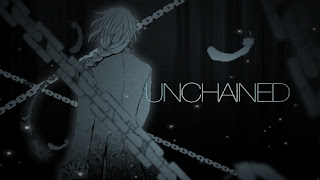
Unchained
Nothing like an awesome to MMV (manga music video) to mix things up. Superb editing on this video, never having a still image and run...
-
 Nothing like an awesome to MMV (manga music video) to mix things up. Superb editing on this video, never having a still image and run...
 -
 Not much to say here. Fast, action packed anime music video with a good metal song. The anime looks pretty interesting, after reading...
 -
 The editor Shin has done it once again, blending just the right song with finely picked clips from just a single anime. Have yet to se...